Your widget tree is already a list of options: where Jev fits in a Flutter project
A model that picks from a list and cannot write text. What it can do for Flutter, and when you should not use it

If you have written E2E tests for a Flutter app, you have probably run into this: someone renames one widget key or changes a button label, and a whole row of tests turns red. Then the time goes into fixing test scripts instead of real problems in the app.
In mid-September, TypeSafe AI released Jev, a model made only for decisions. It works differently from a normal LLM. We first list the possible answers as options, then it picks one of them and tells us how sure it is, but it never generates any text.
When I saw this design, the first thing I thought of was Flutter. Every widget on a screen that you can tap or type into is already part of a limited list, so if we give that list to Jev, it should be able to decide the next step of an E2E test, and when the UI renames something, it can read the new name from the current screen. For the past few weeks I connected it to the E2E tests of a Flutter app and ran it many times, and in this article I want to share the process and the results with you.
Here is the conclusion first. In E2E tests, letting Jev pick every step, letting an LLM write only the text, and asking the LLM to referee when Jev cannot decide, was the best value combination I measured:
- Correct → 18/18, the same as an agent that uses an LLM for everything
- Robust → 12/12 after the UI renames
- Fast → 1.7x faster than the all-LLM agent
- Cheap → 3.5x cheaper than the all-LLM agent, with zero false passes
The rest of this article covers what Jev can do for Flutter, how it differs from a normal LLM (not quite what I expected), how to combine the two, and which situations did not work well in my tests. All numbers were measured on my own machine.

A few terms used in this article:
- marionette → an open-source tool from LeanCode that lets an outside program read and control a running Flutter app
- E2E test → a program operates the app automatically and goes through the flow a real user would
- agent → the model looks at the screen and decides the next step by itself, instead of following a script
How the widget tree connects to Jev#
First, the overall architecture. The app, the runner and the judging all run locally. Only two kinds of request leave the machine: asking Jev for the next step, and asking an LLM to write text or to referee.

From a running app, marionette can read each interactive widget’s type, key, visible text, enabled state and position. I turn that into a list like this:
@e1 TextField key=email_field = (empty)
@e2 TextField key=password_field = (empty)
@e3 CheckboxListTile key=remember_me
@e4 FilledButton key=signin_button
@e5 TextButton key=forgot_password_button
This list goes into the request to Jev almost unchanged:
body = {
    "model": "jev-latest",
    "state": state,                      # screen + task + actions taken so far
    "questions": {
        "nextAction": {
            "type": "choice",
            "instructions": "Pick an action that moves the task forward",
            "criteria": {a.id: a.description for a in actions},
        },
        "taskComplete": {"type": "noul",
                         "instructions": "Looking at the screen only, is the task done?"},
    },
}
The important line is criteria. Its value is the list of actions read from the screen, in the form {action id: what this action does}, and the model can only answer with one of those keys.
I also really like that questions can hold several questions at once. The request above asks two things: “where to tap next” is a choice question, and “is the task already done” is a noul question that returns a judgment from 0 to 1. One round trip gives us two answers. The “is it done” question matters a lot later, because it decides whether the whole test can report a false success.
Of course, there is still a layer of code I wrote in the middle, and it is not short. By default marionette returns every property of every widget, including the controller, decoration, colorSpace and so on. A sign-in screen with only nine elements is already 5,488 characters, about 1,370 tokens. After converting it into the format above, it is only 337 characters, about 85 tokens, which is 94% smaller. The description of each action is also generated by the code.
At first I thought Jev would at least save us from handling hallucinations, because an LLM might invent a button that does not exist, while Jev can only answer with a key from the list. After testing, this advantage turned out to be smaller than I thought. As long as the LLM uses structured output and its answer is limited to the keys of the same list (Gemini’s responseSchema supports enum), it never picked a nonexistent action in 749 decisions, with zero retries. So for hallucinations, both sides can rely on the type system.
What really makes Jev different is the probability it returns. There is an experiment about this later, and it was the result that surprised me the most.
The same pattern appears in other places. When GenUI decides which widget to use for the next screen, it also picks one from a catalog of widgets. In the next section I simulate this step and measure it, without using the real GenUI. Support ticket classification and PR risk levels in CI look similar too, but I have not actually tested those two. My own rule is that if the range of possible answers can be listed, this approach probably works.
Separate deciding from producing#

This section started from a demo that Abdallah Shaban shared on X: a Flutter GenUI screen where every widget was picked by Jev from a widget catalog, and he said it felt as fast as running everything locally. Someone asked under the post, “where does the text in the widgets come from?” In this section I first break down that “fast” and measure it. Where the text comes from is answered later, in the “Let Jev pick, let the LLM write” section. Below are the measurements; the catalog and the data are my own.
I did not use Flutter’s genui package. I only simulated the step where it picks a widget: I wrote my own widget catalog, let the models output the A2UI format GenUI uses, and measured what they returned and how long it took. With the same catalog and twelve real chat turns, each run three times, I compared three approaches:
- Gemini writes the full UI description JSON
- Gemini only returns the name of one widget
- Jev picks one from the same catalog

The “only return a name” group is one I added on purpose. Without it, “generating vs picking” and “an LLM vs a model that cannot write” would be mixed together as two variables, and the comparison would not tell us much.
The results can be read in two parts. Letting the model decide and produce JSON at the same time costs an extra 600 ms, and in this sample its agreement was also lower, 75% against 83%. Tying deciding and producing together does not help either side. The other part is that when both only pick a name, Jev is 3.4x faster than the small model.
But I would not say Jev is more accurate. In this round it actually got five fewer answers right, 25/36 against 30/36. Most of the misses were in two turns: for “where is my refund” it picked the order list, and for “what’s in my cart” it twice picked a plain text reply. Twelve turns run three times are really only twelve questions, so this gap is not enough to say which one is more accurate, but we also cannot say they are the same. What is certain is the speed, more than three times faster.
There was also one turn that all three approaches “got wrong”, and later I felt I had labeled it wrong myself. The user said “I got the wrong size”, and all three picked the order list instead of the return form. Thinking about it again, they were right: the user did not say which order, so showing the list first is reasonable. I prefer to list disagreements like this instead of counting them as errors.
After a UI rename: scripts versus agents#
Let’s start with the most direct example. In the demo app, I renamed the key nav_orders to nav_orders_v14. The hand-written test script could not find the widget and failed at step 4, while the agent running the same flow finished all 13 steps. Here is its log:
step 4: Tap @e7, the NavigationDestination nav_orders_v14
step 7: Tap @e2, the FilledButton start_return_button_v14
step 8: Tap @e3, the FilledButton return_next_button_v14
Nobody told the agent that the name had changed. It read the new key from the current screen and used it directly.

I added these changes to the demo app on purpose. The app has a switch that takes a number (called a seed in the code; the same number always produces exactly the same changes, so the script and the agent face the same set of changes). It renames about two in five widget keys, swaps a few button labels and shuffles some lists, which is the kind of UI change a team makes in a normal week of development.
We need to be clear about what this example proves. A hand-written test hard-codes the UI’s implementation details, and an agent does not, so when the UI changes, the script has to be updated and the agent does not. An LLM agent can do the same, just slower and at a higher cost. I measured this too: with the same four flows and the same value table, only changing the deciding model from Jev to gemini-3.1-flash-lite, both were 12/12, and the LLM was 2.7x slower and 4.7x more expensive.
After expanding to 4 sets of changes with 3 runs each, the results are:

The script failing every time was what I expected. The surprise was that “Jev only” got just 6/12. Its choices were right. It stopped on seeds 7 and 91 because those two seeds renamed the email field, from email_field to email_field_v17, while my hand-written value table still looked values up by the old key. With no value found, Jev could tap the field but could not type into it, its confidence dropped, and it stopped before the threshold.
In other words, a value table is also a kind of selector. When the UI is renamed it breaks as well, just in a safer way. The two approaches where the LLM writes text from the current screen do not have this problem, and the one where Jev does the picking is 1.9x faster and 4.3x cheaper. Its one miss has nothing to do with the rename. It was the navigation stop I explain later, and with the referee added it went to 12/12.
So in this example, the real value Jev brings is the risk-tiered threshold table later in this article, not just the fact that the test passed.
There is also one case I originally wanted to use as an example and later downgraded myself. In the first comparison, the hand-written support flow got stuck on contact_us_button. This button is below the FAQ list, outside the screen, so the script could not tap it. The agent passed, because at step 5 it typed refund into the search box, the list got shorter and the button appeared. That step was not in the script, and I had not thought of it either. However, the string refund came from my value table. Jev does not produce text; what it did was decide to use the search box to move forward. So this is more of an advantage of agents in general, not something special about Jev.

This value table later became the bottleneck of the Jev-only approach, and the 6/12 above was caused by it. I explain later how I handled it.
Why give the decisions to Jev: risk-tiered thresholds#
I got this part wrong at first. I set one global threshold: below a confidence of 0.55, stop instead of guessing. The model kept picking the right next step and kept getting blocked. Once it correctly chose to “fill in the password, then tap sign in” with a confidence of 0.45, and it was blocked.
Then I went back to the official docs, which explain it clearly:
low confidence on a Choice often means none of the options are a clear winner over the others
The confidence of a Choice shows how flat the probability distribution is, in other words how closely the options compete, which is a different thing from whether the answer is right. When two actions can both move the flow forward, a low confidence is actually an honest answer, and blocking it is the mistake.
After I set a different threshold for each kind of action based on its risk, the problem was solved:
CONFIDENCE_FLOOR = {
    "scroll": 0.20,   # just scroll back
    "fill":   0.30,   # typing can be redone
    "tap":    0.35,   # navigation can go back a page
    "submit": 0.70,   # writes something the user will see
    "finish": 0.60,   # a wrong "done" makes the whole test lie
}
A wrong scroll can just be scrolled back, but a wrong “done” makes the whole test report a wrong result. These two cases should not share one threshold.
For this table to work, the probability itself has to mean something: decisions at a confidence of 0.7 should really be wrong less often than decisions at 0.3. TypeSafe says their probabilities are calibrated, but I did not verify this myself, so I do not treat it as a conclusion. Verifying it needs a correct answer key, and this task does not have one. What I can share is the result in practice: after switching to risk tiers, all 24 runs passed, while the old global 0.55 threshold blocked correct decisions. It is not as good as a calibration curve, but at least it is what I actually saw.
Same wrong data, only one side reports a false pass#
Later I added an experiment to see whether this probability actually helps when something goes wrong.
The task was “report that order 5198 arrived damaged”. I deliberately did not update the value table, so it still held the values from another flow: order 5213, with the message “my parcel has not moved in four days”. Then Jev and gemini-3.1-flash-lite each ran it three times. Both got exactly the same screens, candidate actions and value table; only the deciding model was different. For judging, I did not look at what the agent reported. After each run I read the app’s store directly to check whether a support ticket was sent and what it said.

The LLM reported success all three times, and all three times it was wrong: it sent the wrong support ticket and still reported the task as done. Jev did not finish any of the three, but it did not write any wrong data either. Another task, “add a new address labeled Home”, went the same way, with Office in the value table. The LLM saved an Office address from the table and reported success, all three times. Jev filled in Office from the table, its confidence dropped to between 0.28 and 0.34, and it stopped.
Jev’s probability reflected that the input did not match the task, and the LLM’s self-reported confidence did not. This was the first time the risk-tiered table had experimental data behind it, not just “it passes when we use it”.
The scope of this experiment needs to be clear too. The temperature was 0, so three repeats are not three independent samples; it is closer to looking at the same situation three times. And it is only two tasks and one app, not a full calibration curve. But the direction is clear: a test that reports a false success is more dangerous than a test that fails, and that is exactly the difference here.
If you want to use this in a real project, I suggest spending half a day first: group the decisions you have run by confidence, label them right or wrong by hand, and see what the curve looks like. This is also the next thing I want to do.
The way I used to build tools was the opposite: let the model decide freely, then add checks afterward to catch hallucinations. Defining the options in code, letting the model only pick, and setting thresholds by risk is a different approach, and the threshold is a number you can tune, not a prompt.
When I reran everything with the new home screen, I ran into a real example. The new home screen has two equally correct ways to reach the orders page: the Orders tab at the bottom, and the “Your orders” shortcut. Jev’s confidence at this step was between 0.34 and 0.53, with the probability split across two correct options. Out of the 27 decisions the return flow made at this step, 3 landed exactly at 0.34, below the tap threshold of 0.35, so it stopped. It did not pick wrong and did not report a false pass; it just honestly showed that both ways were fine. This is also why thresholds should be tiered by risk: navigation can go back a page, so its threshold can be lower, or the screen can keep only one way. I did not tune the threshold to make the numbers look better, so that is where the no-referee results of 17/18 and 11/12 come from.How the referee closes those two gaps is in “When Jev cannot decide, ask the LLM to referee” below.

Following this, I also ran into a more basic problem. Once I saw a confidence of only 0.40, and my first thought was that the model was not strong enough. After checking, I found that the home screen had eight InkWell and GestureDetector widgets without keys, so the option list contained eight tap_gesturedetector_x_x_x_x entries. When the options themselves are unclear, the model’s confidence cannot be high.
Let Jev pick, let the LLM write#
We already saw the weakness of the Jev-only approach: it cannot write, so it cannot type anything the value table does not have. It got 0/6 on the two new tasks, although it safely stopped every time.
So I split the two jobs. Which action to take at each step is up to Jev, and only when a new input field appears do I call gemini-3.1-flash-lite once to write the text. Once for sign-in and once for a form, a full run calls the LLM only 2.7 times on average, and Jev handles all the other steps.
One step looks like this, with Jev and the LLM each appearing only in their own part:

This is what a real run of the combination looks like. The task is one sentence, “sign in and report that order 5198 arrived damaged”. Filled tags are actions Jev picked, outlined tags are text the LLM wrote after reading the screen, and the last frame shows the support ticket the app actually received:

The same task, “report that order 5198 arrived damaged”, run once with each of four approaches:
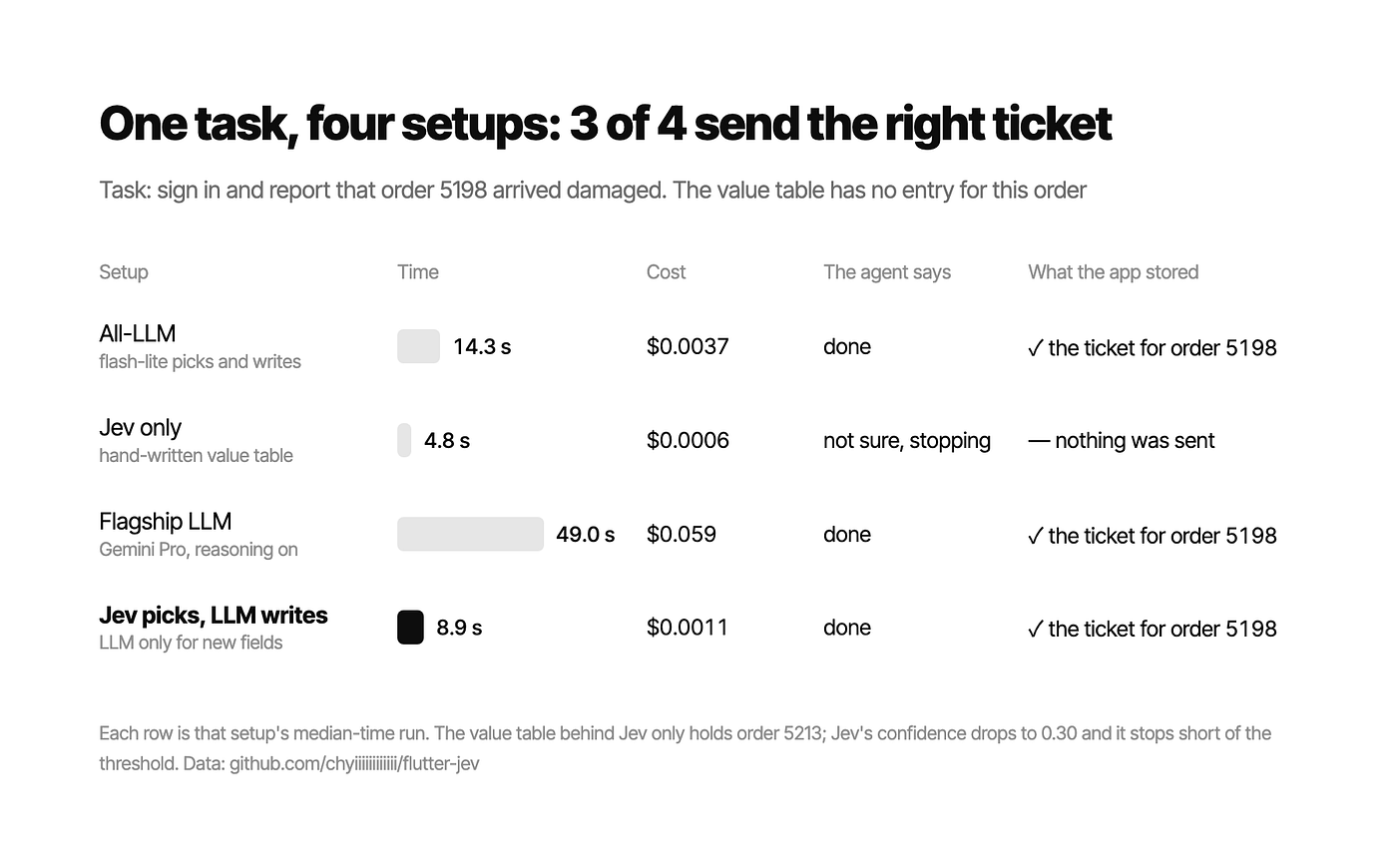
When Jev cannot decide, ask the LLM to referee#
Earlier, on the new home screen, Jev could not decide between two correct ways and stopped at the threshold 3 times. To handle this, I did not change the threshold. Instead I added a seventh approach: when Jev is not confident enough on a step that can be undone (tap, scroll, typing), it does not stop, and flash-lite picks one from the same options instead. Submitting and judging “done” still stop, because low confidence there usually means the input data itself is wrong. I ran a separate batch of the six tasks plus the four UI changes, 30 runs in total. All of them finished with no false passes, at $0.00098 per run, almost the same as $0.00094 without the referee. The referee was called only once, on the renamed home screen at the step where confidence was 0.33. It picked the Orders tab and the flow finished. Only one tie came up in 30 runs, so part of this 30/30 is luck, but the direction is clear: when there is a tie, asking once more is a better deal than stopping.
Comparing all seven approaches#
Six tasks (the original four flows plus two new tasks), three runs for each approach, judged by reading the store as before:

The sixth approach, the combination without a referee, got 17/18 and the all-LLM agent 18/18.The one miss was the navigation stop mentioned above, and it wrote no wrong data. The seventh approach with the referee closed the gap at 18/18. In return it is 1.7x faster and 3.6x cheaper. After the UI renames, the combination got 11/12 and the all-LLM agent 12/12, with the combination 1.9x faster and 4.3x cheaper, while the hand-written script got 0/12. Compared with the flagship model, the combination is 5.8x faster, 57x cheaper, and more accurate. Pro got 14/18: in the support flow it went to the tracking page of order 5213 all three times instead of the support tab, and finally reported that it could not finish. In a flow that moves forward one step at a time, more reasoning only makes it slower and more expensive, and the accuracy did not go up with it.
The first version of the combination actually missed once, because I wrote the prompt wrong. The task “add a new address labeled Office” did not mention a street, and I had told the writing model to “leave fields the task does not need empty”, so it left the required address field empty too. Jev’s confidence when saving was only 0.29, so it stopped and wrote no wrong data. After adding “for a required field the task does not mention, fill in a reasonable value”, it did not happen again, and all later numbers use the fixed version.
The hand-written script is still the fastest, as long as it is correct. For new tasks there is no script at all, and someone still has to write one.
This split follows the same idea as the GenUI section: writing goes to the model that can write, and only when needed. Picking each step and judging whether the task is done goes to the model that honestly tells you how unsure it is. When it cannot decide and the step can still be undone, we ask the model that can write to pick once.
Before you start: the quality of your key names#
This part is specific to Flutter, and it is something I did not expect.
The agent’s action descriptions are generated from key names. Key(‘start_return_button’) becomes “Tap the FilledButton start_return_button”, and the model can understand what that is. On the other hand, if the keys are named carelessly, or there are no keys at all, the agent can only match on visible text, so it breaks as soon as the copy changes and becomes as fragile as a hand-written script again. How well your keys are named directly affects how understandable the options are for the model.
One more detail, so you do not waste a round of testing like I did: changing only the key without changing the Semantics identifier is the same as not changing it, because the tool falls back to the identifier. The first time I ran the rename experiment it had no effect at all, and it took me a long time to find out why.
When it is worth it: split the total time first#
To decide whether Jev fits a situation, my way is to split the total time first and see how much of it the model calls take.
For this project, the conclusion is not very good for Jev. One return flow takes 12.8 seconds. Split up: Jev made 18 decisions in 4.4 seconds (35%), 189 transport calls took 1.9 seconds (15%), and the remaining 6.5 seconds or so (51%) were spent waiting for the app’s own animations and loading.

The model is only a bit over a third of the time. That means even if Jev took zero seconds, the whole test would only be about 1.5x faster, 1.53x by the breakdown above. The rest of the time goes to Flutter’s page transitions, waiting for the screen to settle, and the number of steps itself, none of which depends on the model’s speed.
At first I spent a whole round tuning parameters and the multiplier never showed up, because the part I was optimizing was only a third of the total. I should have split the time first and then decided what to tune, and I only realized this after I was done.
My rough rule is:
- The model is 80% of the time or more → the multiplier shows up directly, and switching is well worth it
- The model is only a third → the ceiling is about 1.5x, and you will barely feel the difference
- Somewhere in between → do the math yourself
The best fit is a judgment that finishes in one call, such as classification, routing, scoring, filtering, or acting as a verifier for another model. It fits less well when the model is just one small step in a loop, like driving a UI, crawling web pages, or anything that waits for an outside system.
The multiplier is real in single-call tasks#
To check this, I ran a separate single-call experiment, used for picking stories for my daily tech digest. Given one news item, it returns three typed judgments: whether to include it, which category it belongs to, and how technical it is. The material was 20 real Hacker News items fetched from the API, and each of the three models ran 40 times.

Compared with a flagship model that reasons, Jev is 19.5x faster and 220x cheaper. The gap comes mostly from 364 thinking tokens. The flagship model’s final answer is only 26 tokens, but before that it writes 364 tokens of thinking that the user never sees, and you still pay for the time and the cost.
The trade-off is agreement. On the same 20 items, Jev and the flagship model agreed on “include or not” 14/20 and on “which category” 13/20, and on both at the same time only 9/20. Neither side is a correct answer key. “Would a senior engineer want to read this” is a subjective judgment, and two people would not agree on everything either, so I can only talk about agreement, not accuracy.
The more complete way to say it: 19.5x faster, 220x cheaper, a third of the answers differ, and this experiment cannot tell which side is right.
What E2E tests actually get#
Driving a UI is not where the multiplier lives, so what does Jev bring to E2E tests? First the numbers, four flows with three runs each, all 24 runs passed:

The script is faster on all four flows. The script already knows the answer to every step, while the agent has to ask the model at each step. As long as the script is correct, it will always be faster, and tuning parameters cannot change that.
I ran into the “as long as the script is correct” condition myself. After I moved the “Add to cart” and “View cart” buttons on the product page into a bar fixed at the bottom of the screen, the add-to-cart script became more than 6 seconds slower on every run. The reason was two scroll_to steps still left in the script. The buttons were already on screen, so scrolling changed nothing, and the runner kept waiting for the screen to change until it timed out. When a script no longer matches the UI, the result is not always a failure. Sometimes it just gets slower quietly, and the test still looks green.
So the benefit Jev brings to E2E is two things other than speed. The first is the rename example earlier: when the UI changes the script breaks and the agent does not, which happens almost every week in real projects. The second is that the cost is low enough to ignore. One full run costs $0.0007 on average, about 15,000 input tokens. Running four flows for each PR costs about $0.0026, twenty PRs a day is five cents, and a month is about one and a half US dollars. The median latency of each decision was between 221 and 236 ms, measured from Taiwan to the US West.
Agent tests used to be hard to put into CI mainly because they were slow and expensive. The slow part is still there, about 1.5x to 3x slower, but the cost is no longer a problem.
How to start#
Putting it all together, among the agent approaches, the combination with the referee is the best value: the same accuracy as an all-LLM agent, much better speed and cost, and no false passes.
Jev no longer has a waitlist. I use an official TypeSafe API key: sign in at console.typesafe.ai with Google or email, and create one under Settings → Keys. I recommend the official key first, because the direct connection is the fastest, and all the latency numbers in this article were measured on it, from Taiwan to the US West. If you cannot use an official key, you can also call Jev through OpenRouter, but the extra hop is much slower. In my tests a call through OpenRouter took 1.3 to 2.2 seconds, while calling TypeSafe directly took about 0.36 seconds.
If it were me, I would start like this:
- Use it first on flows whose UI changes often, places where hand-written scripts often break, and new flows nobody has written a script for yet. These are where an agent does better than a script: after the UI renames, the script got 0/12 and the combination with the referee got 12/12. Critical flows that are stable can stay as they are. As long as the script is correct, it is still the fastest (3.8 seconds) and free, so the two can live side by side.
- Give each step’s choice and the “is it done” judgment to Jev, with thresholds set by the risk of the action: 0.70 for submit and 0.60 for judging done.
- Call a cheap LLM to write only when a new input field appears, and remind it: “for a required field the task does not mention, fill in a reasonable value”. For steps that can be undone, like tap and scroll, if Jev is not confident enough, let the same LLM referee once.
- When judging the result, read the app’s state directly instead of trusting the pass the agent reports. That is how the three false successes above were caught.
The cost is about $0.001 per full run. Twenty PRs a day with four flows each comes to about 8 cents.
There are also a few things to watch out for. I ran into thirteen problems along the way, and half of them came from the tools themselves. A hot restart replaces the isolate, so a persistent connection keeps holding a tree that no longer exists. Elements outside the screen do not appear in the list at all, rather than being marked as invisible. A SnackBar removes the buttons under it from the widget tree completely until it closes. And on macOS, when the app window is fully covered by another window, it stops drawing, so the agent reads an empty screen and every approach fails at the same place, which is easy to mistake for a model problem.
The sample size also needs to be clear: one app, three runs for each case, temperature 0. If you want to use these results to convince your team, I suggest running it on your own app first.
Conclusion#
What this experiment made me more sure of is that a Flutter widget tree and a model like Jev, which only makes choices, work well together. Adding an LLM to write text and to referee when Jev cannot decide covers accuracy, robustness, speed and cost at the same time. It does not make E2E tests faster than scripts, but it makes them handle UI changes better, and it does not report false successes.
The code is open source, including the thirteen-screen demo app, the runner with a persistent websocket, and the comparison scripts that produced the charts in this article (the main experiments are in runner/arms.py, together with a snapshot of the store after every run): https://github.com/chyiiiiiiiiiiii/flutter-jev
My next step is to connect Jev to the story picking of my daily digest, because it is exactly the kind of task that finishes in one call: one news item in, three judgments out, no loop and no waiting for other systems. Based on the numbers above, the cost of that part can drop by two orders of magnitude. I will share the results when I have them.
References#
本文原刊登於 Medium。